This post was written by me through an activation with HireInfluence on behalf of 4-H. Although I received compensation for participating in the campaign, all thoughts and opinions are my own.
From the food we eat, gadgets we love, medicine we depend on, and the music we enjoy, computer science is all around us. There’s no doubt that technology is changing the job market but how do you teach kids computer science skills when you may not feel so tech savvy yourself?
Knowing where to find reliable resources you can use to learn with your kids certainly helps. This year 4-H makes it easy for families learn computer programming together thanks to their (4-H NYSD) resources. 4-H NYSD is an annual initiative celebrated today —October 1— to inspire kids everywhere to take an interest in STEM topics (science, technology engineering, and math).
About 4-H National Youth Science Day’s Code Your World
To encourage kids to get involved in computer science 4-H NYSD’s kit ($21.95 from 4-H) includes a series of challenges that teaches up to 10 kids computer science skills through fun topics like digital animation, gaming, and dance.
The kit, developed by Google and West Virginia University Extension Service, contains everything parents need to introduce their kids to coding at home, through an in-class lesson at school, or through an after-school activity. Activities in the kit include a computer-based activity using Google’s CS First platform and three unplugged activities.
About the Code Your World Activities

The beauty of the is having everything you need to teach coding skills in one convenient place. The Facilitator’s Guide provides background to comfortable teach the computer science topics covered in the NYSD challenge, a concise overview of how to prepare for each activity, activity lesson plans, and helpful grid for each activity depending on if you want to do the full challenge, (45-60 minutes), short and sweet version (30-60 minutes), or the low tech unplugged model. Each of the activities are standalones, meaning you can pick and choose to do one, some, or all. Each exposes kids to different aspects of computer programming. Here’s an overview of the four activities included in the Code Your World challenge kit designed to bring coding to life.
Animate a Name

Animate a Name teaches decomposition and algorithm design and is the only activity that requires a computer/tablet and internet connection. In Animate a Name, kids use CS First, Google’s free block-based coding language, to build a customized animation using code. Instructional videos are used to guide students through combining blocks of code to make projects come to life with motion, captions, and sound in order to teach them how customized animations can be created through coding. This video provides more information about Animate a Name. This activity is also available in Spanish!
Code Your Dance
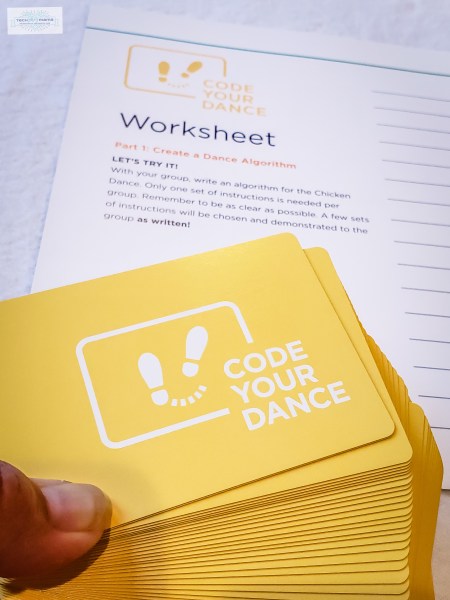
Code Your Dance is a two-part activity that teaches decomposition and algorithm design. Kids will learn how computers think and the basic principles of writing instructions for computers to follow. The first part teaches algorithm and program design by having kids write code for the Chicken Dance. The second part involves using the included Code Cards to design a dance and teach it to others. Take a look at the dance we designed when we tried this activity and see if you can figure out what geometric shape is made through our dance!

Artificial Intelligence

This activity introduces kids to the concept of artificial intelligence and how it can be used to make decisions. Pattern recognition and algorithm design are key concepts covered during this two part lesson. The first part of the lesson involves kids working in groups to play Rock, Paper, Scissors with dice and learn about random number generation which is an important component of many computer programs. In the second part of the activity, groups replace their dice with coins and evaluate different algorithms.
Color Your World

Color Your World introduces kids to pattern recognition, algorithm design, and abstraction through a puzzle in computer science called map coloring. Map coloring involves finding the fewest number of colors to fill a map so no color is the same color of any of its neighbors. This two part activity introduces the idea of pattern recognition, a key skill in breaking down problems into smaller parts and creating reusable solutions. In each part of the activity, kids color maps to determine the minimum number of colors required for each and to learn to recognize patterns that appear in maps that follow these rules. The second part of the activity requires them to use what they’ve learned to create their own world maps.
Four Reasons to Get Your Code Your World Kit Today!

We know that computer science is important for today’s kids to learn and I love how teaches essential problem-solving skills in age appropriate ways that are engaging and fun. If you’re still not sure about using Code Your World with your group, here are four additional reasons why you should !
- Everything you need to teach coding skills in one convenient place. Parents who are nervous about teaching computer science for the first time, shouldn’t be! The Facilitator’s Guide in an excellent resource to make you feel confident about teaching computer science to kids ages 81-12.
- Affordable way to teach kids essential skills. NYSD Code Your World Kits are available from 4-H for $21.95 and include materials for 10 kids to participate in lessons. If you have more than 10 kids in your group, you can download and print as many of the copies of the worksheets in the Youth Workbook as needed making this a very affordable way for families, schools, clubs, and Scouting organizations to introduce computer science to kids.
- Not all lessons involve a screen. I appreciate that Animate a Name is the only activity that requires the use of a computer or tablet and the other 3 can be taught in an unplugged way.
- Lessons can be done in any order and at any time. Today may kick off National Youth Science Day once you have a Code Your World kit, you can do these activities at any time. It doesn’t matter if you do them all in a day, once a week, or once a month. Kids learn important skills regardless of when they’re taught and you can implement the activities based on your schedule.

The Code Your World Kit includes materials plus all instructions to facilitate interactive activities. Here’s a look at what’s included in each kit for $21.95:
- Facilitator Guide
- Youth Workbooks (x10)
- Certificates of Completion (x10)
- Completion Badge Stickers
- Scratch Coding Challenge Cards (x13)
- Scratch Username and Password Sheet
- Dance Code Cards (two sets of 26, plus 2 reference cards)
- Dice (x5)
- Wooden Coins (x5)
- Code Your Dance Poster
- Crayons (x40)
- USB drive with offline versions of Scratch and Adobe Air, Animate a Name Offline Instructions, Careers with Code Magazine, and printables of all the above materials and certificates in case you need more for your group

For more information about 4-H National Youth Science Day and Code Your World:
- Visit the 4-H website
- Like 4-H on Facebook
- Follow 4-H on Instagram and Twitter
- Order your Code Your World kit here
About 4-H
Founded in order to provide young people opportunities to improve the world around us through hands-on learning, 4-H recognizes the need for today’s youth to have digital skills that will enable them to use technology to solve problems. The organization has a 100 year old history as the nation’s largest youth development organization. Their goal is to help kids and families gain necessary skills to be proactive forces in their communities and develop ideas for a more innovative economy through in-school and after-school activities, clubs, and camps that suit a variety of interests, budgets, and schedules.
This post was written through an activation with HireInfluence on behalf of 4-H. Although I received compensation for participating in this campaign, all thoughts and opinions are my own.


Thank you a lot for sharing such useful articles!
This is right up what our youngsters would like to learn coding. Hope to add this to our tool kit!
This looks fascinating thank you for the information!
This is amazing! Thank you so much!
This looks perfect for my almost 9yo. We started playing Robot Turtles with him a few years ago and he got the concept quickly, so this would be a great “next step” project to do with his programmer dad.
This kit looks so useful in learning coding for my son. Kids can have fun screen free learning time with it. Thanks for the useful article.
The Code your World Kit appeals to my family because I homeschool my little brother and he wants to learn coding however the only coding I know is VB 6.0 and VB.net
What a great giveaway! I run a 4-H club and this would be so useful plus my husband and kids are all about learning to code.
This would be great for my son. He loves this kind off stuff.
love such easy way of teaching coding to kids.
My sons would love to learn how to code. They are inquisitive young boys and this is right up their alley.
I’m an advocate for igniting a passion for computer science. I believe work like yours is important because we have to have more representation with our minority, female, and special needs population in the computer sciences. The future is now.
This looks like a great start to teach coding. If luck enough to win, I would experiment with my youngest and then use it with local girl scout troop who just recently added stem/robotics patches. Thanks for a great giveaway .
I code because it is educational and fun
I would love to use this with my daughter’s Girl Scout troop.
I teach coding to K-5th graders and am definitely interested in this Learn To Code Kit to use with my curriculum. Today’s youth have a natural instinct for computer science. I’m a firm believer that all kids no matter age or gender or race should learn how to code!
I love how this features unplugged activities and includesa a younger age group. I strongly believe in introducing computer science skills to primary students.
This would be a great way to introduce coding to my homeschooling kiddos. It seems to have everything I need to get started. Would love to win one.
This is amazing! As a homeschooling family it us always great to find materials that help us build up our children the same way public schools are able to. Thanks Hughesnet and 4H! =^.^=
Want to let our girls experience as many STEM and coding related programs and projects we can! Added bonus – our oldest will be old enough to join 4-H in January.
We are homeschooling and my daughter loves science, computers and coding. This would be perfect to add to her curriculum.
I think this would be an excellent opportunity to supplement art with technology. Students can learn to code as they are introduced to graphic design, which may pique their interests in video game and app development.
This is awesome, my son is interested in learning about coding!!
Not only does this look like a lot of fun in a box, it teaches “real world” skills that will be necessary for so many careers. The earlier kids learn these sorts of skills, the better prepared they will be as they reach adulthood and choose a path for their lives. I work with girls in detention centers, many of whom have no marketable skills. They need this!!
I would love to get my neice involved in this what fun we can have being educated
In today’s world, computer skills of all kinds are vital. This kit looks like a great way to begin teaching kids about coding.
This sounds a amazing. Our scout boys will absolutely love this. Theses boys are very much into coding etc. our pack is we need this to help them reach their goals and awards
I’m a Girl Scout Brownie leader and I’d love to share this with my girls. What a cool way to learn. Thanks!
I teach before and after school programs and we love stem and coding. We do a lot of activities that include stem. This is awesome curriculum.
I am excited to learn about this program. I think it would be a great tool for my Cub Scouts.
My daughter loves coding! She is in a coding for girls club at her school